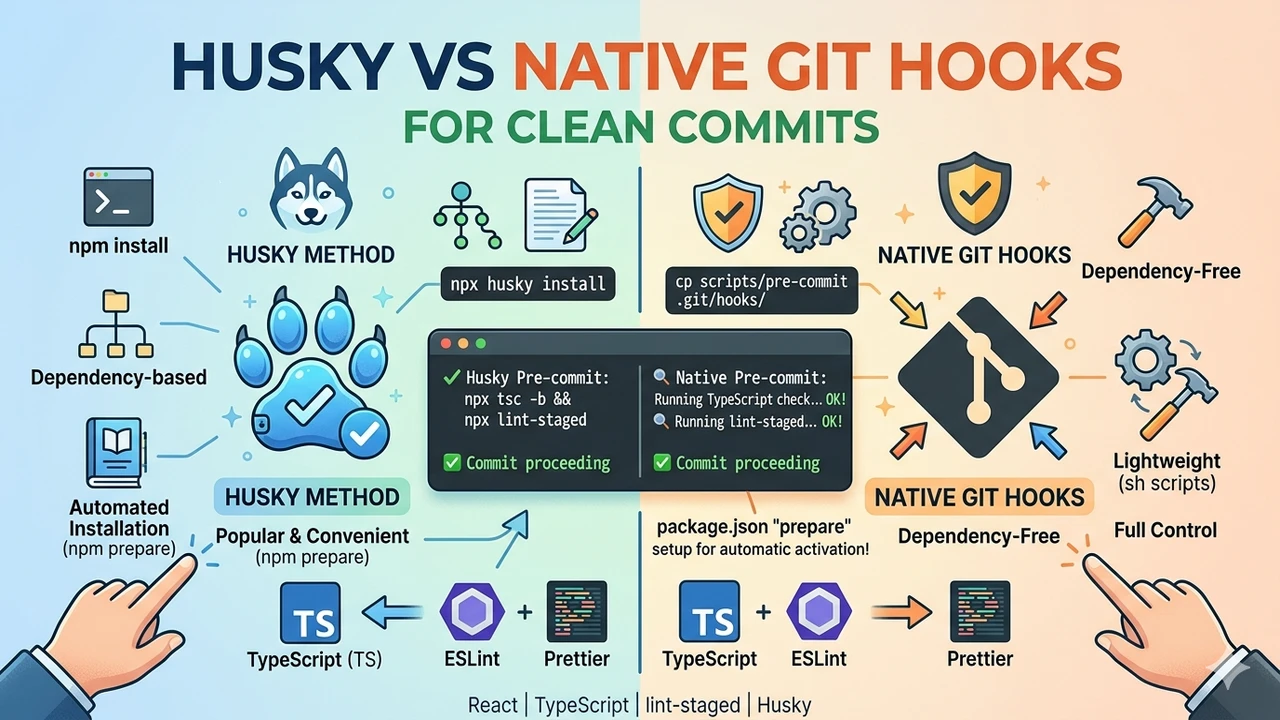
When I built a company-wide React TypeScript template, my main goal was to prevent any linting or TypeScript errors from reaching the repository. Nothing faulty should ever be committed. The solution was a pre-commit hook that runs npx tsc -b && npx lint-staged automatically.
The Problem: Why Pre-Commit Protection Was Necessary
In team-based React development, maintaining code quality is challenging. Developers work under pressure, might forget to run full checks, or stage files with small issues. Without automation, these problems enter git history, break CI pipelines, increase review time, and create technical debt. Our template uses strict TypeScript and ESLint + Prettier. I needed a reliable guard that enforces tsc -b (fast build check) and lint-staged (only on staged files) before every commit succeeds.
First Solution: Implementing with Husky
I started with Husky – the most popular tool for Git hooks in JavaScript projects. It automatically manages hooks during npm install.
Installation steps:
npm install --save-dev husky lint-staged
package.json configuration:
{
  "lint-staged": {
    "*.{ts,tsx}": ["eslint --fix", "prettier --write"]
  }
}
Husky setup:
npx husky install
npx husky add .husky/pre-commit "npx tsc -b && npx lint-staged"
The actual hook file created was:
#!/usr/bin/env sh
npx tsc -b && npx lint-staged
This worked perfectly. Every git commit triggered checks. If successful, commit proceeded. If not, it aborted immediately with clear error messages. Team onboarding was simple – just npm install and hooks were ready.
Husky made the process smooth and developer-friendly for the first version of our template.
The Conversation with My Friend
After using Husky for a while, I showed it to a senior developer friend.
Me: “Husky ensures no bad commits. Super easy.”
Friend: “It works, but why add an extra dependency? Git has native hook support built-in. For a company template, native is cleaner – zero overhead, no npm packages needed.”
Me: “But sharing hooks with the team?”
Friend: “Version control the script in scripts/hooks/ and copy it to .git/hooks/ via setup instructions. Simpler and lighter.”
His advice made perfect sense. Husky is convenient but adds unnecessary weight for a standard lint + type check setup. We decided to migrate to native Git hooks.
Migrating to Native Git Hooks
We created a dedicated folder scripts/hooks/ in the template repo.
Final pre-commit script (scripts/hooks/pre-commit):
#!/usr/bin/env sh
# Company React Template - Pre-Commit Hook
# Ensures no TS errors and clean linting before commit

echo "🔍 Running TypeScript check with tsc -b..."
npx tsc -b

if [ $? -ne 0 ]; then
  echo "❌ TypeScript compilation errors detected!"
  echo "Fix the issues and try committing again."
  exit 1
fi

echo "🔍 Running lint-staged..."
npx lint-staged

if [ $? -ne 0 ]; then
  echo "❌ Linting or formatting issues found!"
  echo "Run eslint or prettier locally if needed."
  exit 1
fi

echo "✅ All checks passed. Proceeding with commit."
exit 0
Team setup instructions (added to README):
# One-time setup after cloning
cp scripts/hooks/pre-commit .git/hooks/pre-commit
chmod +x .git/hooks/pre-commit
Bonus: Auto-Setup via package.json prepare Script
The one downside of native git hooks was the manual cp and chmod step after every clone. You can fully automate this using the prepare script in package.json:
{
  "scripts": {
    "prepare": "cp scripts/hooks/pre-commit .git/hooks/pre-commit && chmod +x .git/hooks/pre-commit"
  }
}
The prepare script is a built-in npm lifecycle hook that runs automatically after npm install. So when a new team member clones the repo and runs npm install, the pre-commit hook is set up instantly — no extra steps, no extra packages.
This approach gives you the best of both worlds: Husky's zero-config onboarding experience with the lightness of native Git hooks.
This native version delivers exactly the same behavior as Husky but without any extra dependencies.
What Happens When Checks Fail?
The hook provides instant feedback:
- Developer runs
git commit -m "add feature" - Script executes TypeScript check first
- Any type error (wrong interface, missing property, etc.) prints detailed output
- Commit aborts immediately – no commit is created
- Same for linting: ESLint errors or Prettier issues stop the process
- Developer sees exact file and line numbers, fixes them, stages again, and retries
This loop forces quality at the source. No more “I’ll fix it later” commits polluting the repo.
Benefits of Native Git Hooks Over Husky
- No additional npm packages
- Smaller package.json and faster installs
- Works completely offline
- Lower performance overhead
- Full control and easy customization
- Better suited for company templates and shared boilerplates
Husky remains excellent for personal projects or when you need many complex hooks. For our use case – simple TS + lint enforcement – native Git hooks are superior.
Results After Implementation
Since rolling out this hook in our React template:
- Lint-related PR comments dropped by about 80%
- CI pipeline failures from code style or type issues became rare
- New developers commit with confidence from day one
- Git history stays clean and professional
- Overall team velocity improved
The single file scripts/hooks/pre-commit turned into one of the most valuable parts of the boilerplate.
Conclusion and Recommendations
Start with Husky if you want quick setup. Then migrate to native Git hooks for a minimal, professional template. Either way, pre-commit checks are essential for modern React TypeScript projects.
Implement this today to keep your repository clean, your CI green, and your team productive.